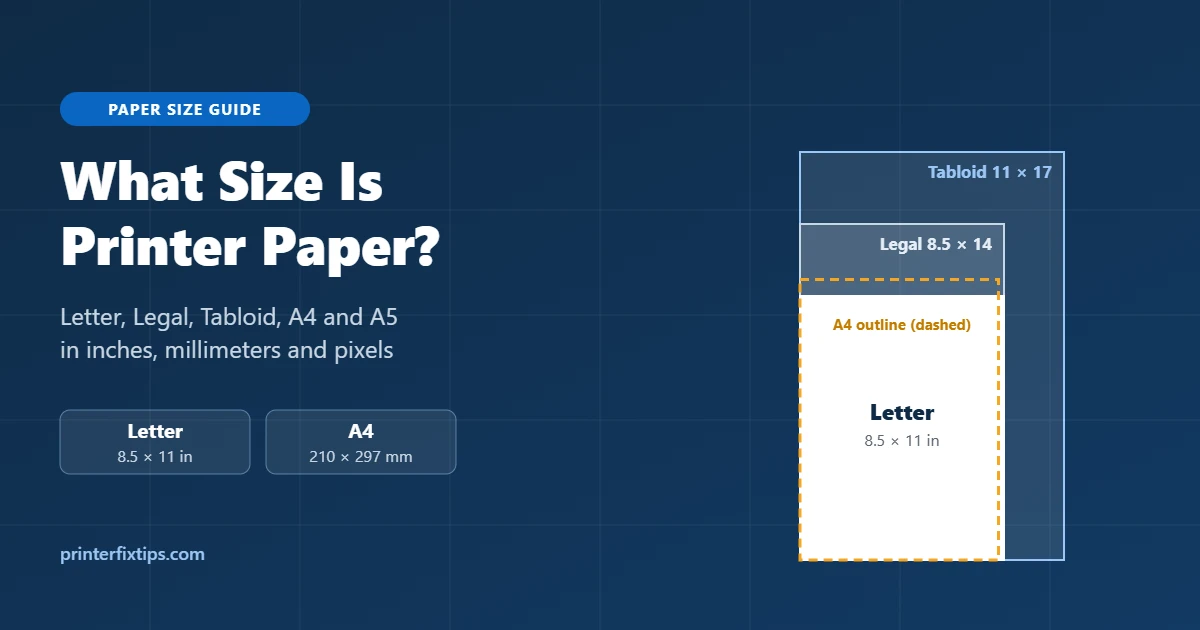
If you just need the number: standard printer paper in the United States is 8.5 × 11 inches. That size is called Letter, and it is what you get in almost every ream of copy paper sold at Walmart, Staples or Amazon in the US. Most other countries use A4, which is a little narrower and a little taller.
Quick answer: Standard US printer paper (Letter) measures 8.5 × 11 in (215.9 × 279.4 mm). The international standard, A4, measures 210 × 297 mm (8.27 × 11.69 in). Legal paper is 8.5 × 14 in and Tabloid is 11 × 17 in.
What Size Is Standard Printer Paper?
In the US, Canada, Mexico and the Philippines, “regular” printer paper is Letter size: 8.5 inches wide and 11 inches long. In millimeters that works out to 215.9 × 279.4 mm. Engineers sometimes call it ANSI A, but on the shelf it is just “8.5 x 11” or “Letter.”
Everywhere else, the everyday sheet is A4: 210 × 297 mm, or about 8.27 × 11.69 inches. A4 comes from the ISO 216 standard, which is used across Europe, Asia, Africa, Australia and most of South America.
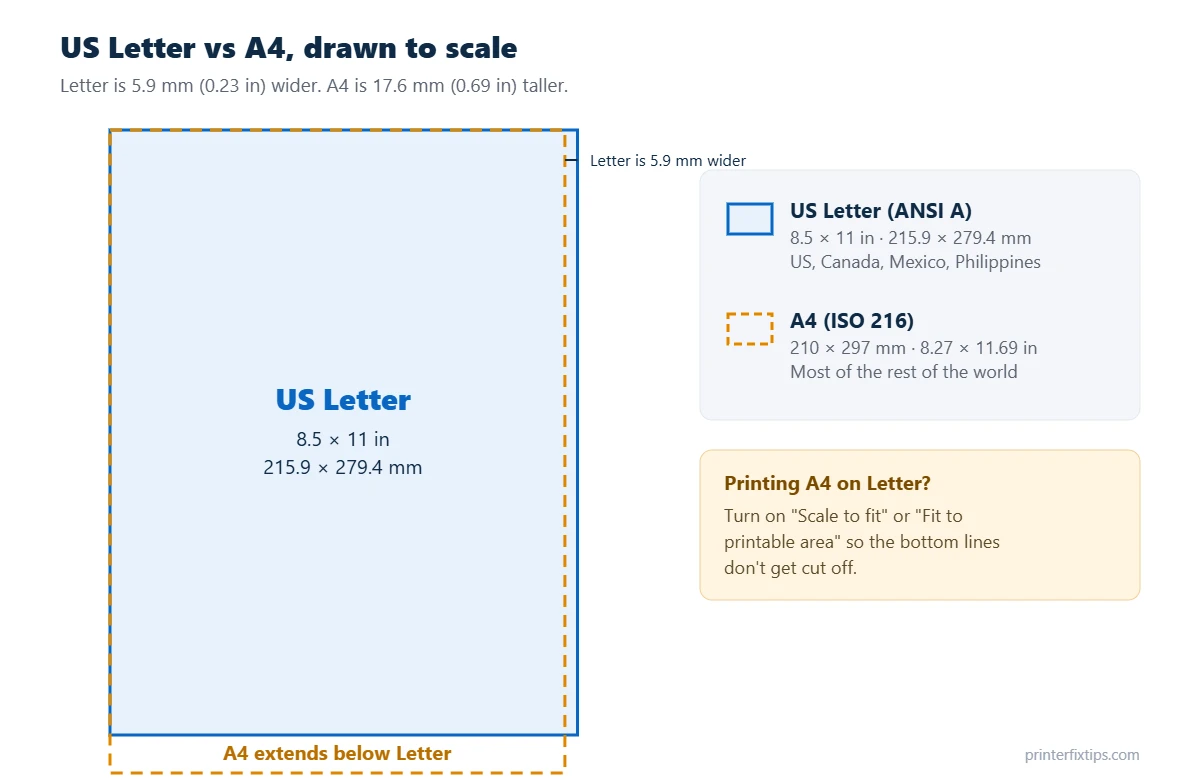
The two sizes look almost the same when you hold them in your hand. Put them on top of each other, though, and you will see that Letter is 5.9 mm wider while A4 is 17.6 mm taller. That small difference is the reason a document made in one country sometimes prints with the last line cut off in another.
Printer Paper Size Chart (Inches and Millimeters)
These are the sizes you are most likely to see in a printer driver, in Microsoft Word or on a box of paper. Home inkjet and laser printers handle everything up to Legal. Tabloid and A3 need a wide-format printer.
| Paper size | Inches | Millimeters | Common use |
|---|---|---|---|
| Letter | 8.5 × 11 | 215.9 × 279.4 | Everyday printing in North America |
| Legal | 8.5 × 14 | 215.9 × 355.6 | Contracts, legal forms, real estate documents |
| Tabloid / Ledger | 11 × 17 | 279.4 × 431.8 | Posters, spreadsheets, drawings |
| Executive | 7.25 × 10.5 | 184.2 × 266.7 | Letterhead, notepads |
| Half Letter (Statement) | 5.5 × 8.5 | 139.7 × 215.9 | Booklets, invoices, planners |
| A3 | 11.69 × 16.54 | 297 × 420 | Posters, diagrams (outside North America) |
| A4 | 8.27 × 11.69 | 210 × 297 | Everyday printing outside North America |
| A5 | 5.83 × 8.27 | 148 × 210 | Flyers, notebooks, books |
| A6 | 4.13 × 5.83 | 105 × 148 | Postcards, small notes |
| B5 (ISO) | 6.93 × 9.84 | 176 × 250 | Notebooks, some books |
Photo paper and envelopes have their own sizes. The ones people print at home most often are 4 × 6 in photos (102 × 152 mm), 5 × 7 in photos, and #10 business envelopes at 4.125 × 9.5 in.
US Paper Sizes Explained
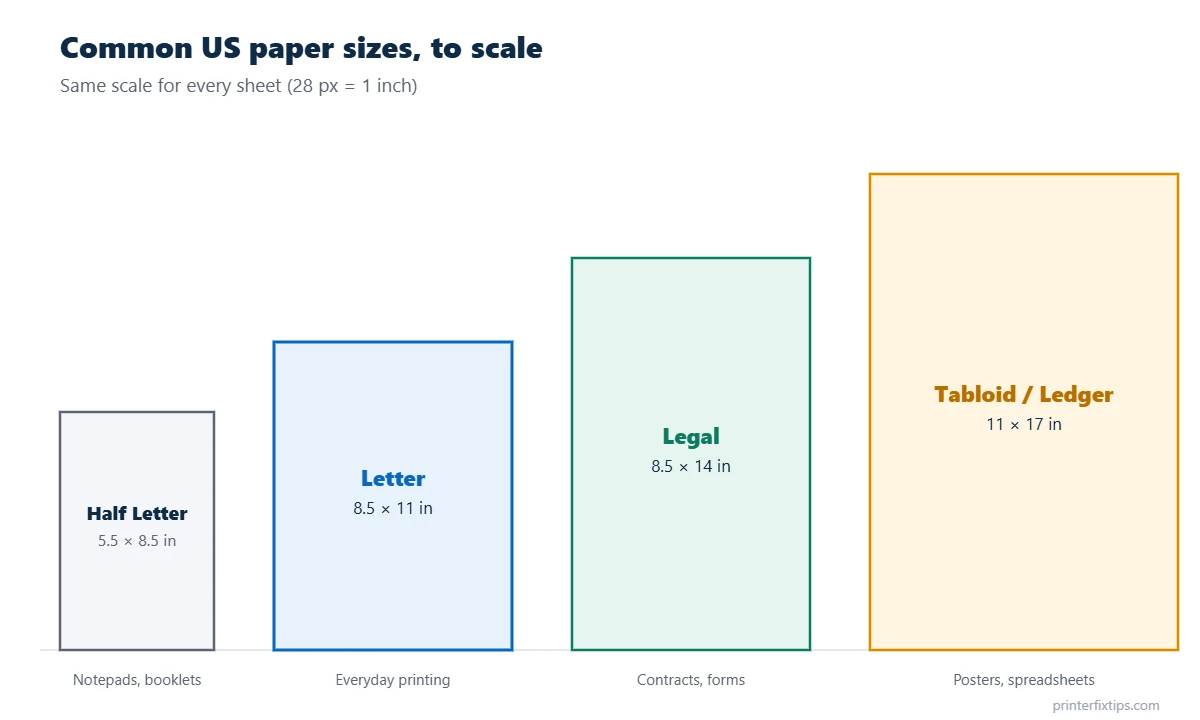
Letter (8.5 × 11 in)
This is the default paper size in Windows, macOS, Word and Google Docs when your region is set to the US. School assignments, resumes, tax forms and shipping labels printed on plain paper are all Letter.
Legal (8.5 × 14 in)
Legal paper is the same width as Letter but 3 inches longer. Most home printers can print it, but you usually have to pull out the paper tray extension and pick “Legal” in the print dialog. If you load Legal paper and leave the setting on Letter, the printer will stop with a paper size mismatch error.
Tabloid vs Ledger (11 × 17 in)
Tabloid and Ledger are the same sheet. Tabloid is the name used when the page is upright (portrait). Ledger is the name used when it lies sideways (landscape), which is how spreadsheets were printed on it. You need a printer that lists 11 × 17 or “Tabloid” as a supported size; a standard home inkjet will not take it.
Half Letter and Executive
Half Letter (5.5 × 8.5 in) is exactly a Letter sheet cut in half, so it is handy for booklets and planners. Executive (7.25 × 10.5 in) is a slightly smaller sheet that some offices use for letterhead.
Larger ANSI sizes
For engineering drawings and plotter prints, the US uses the ANSI series: ANSI A is Letter, ANSI B is 11 × 17, ANSI C is 17 × 22, ANSI D is 22 × 34 and ANSI E is 34 × 44 inches.
A4, A3, A5 and the Other A Sizes
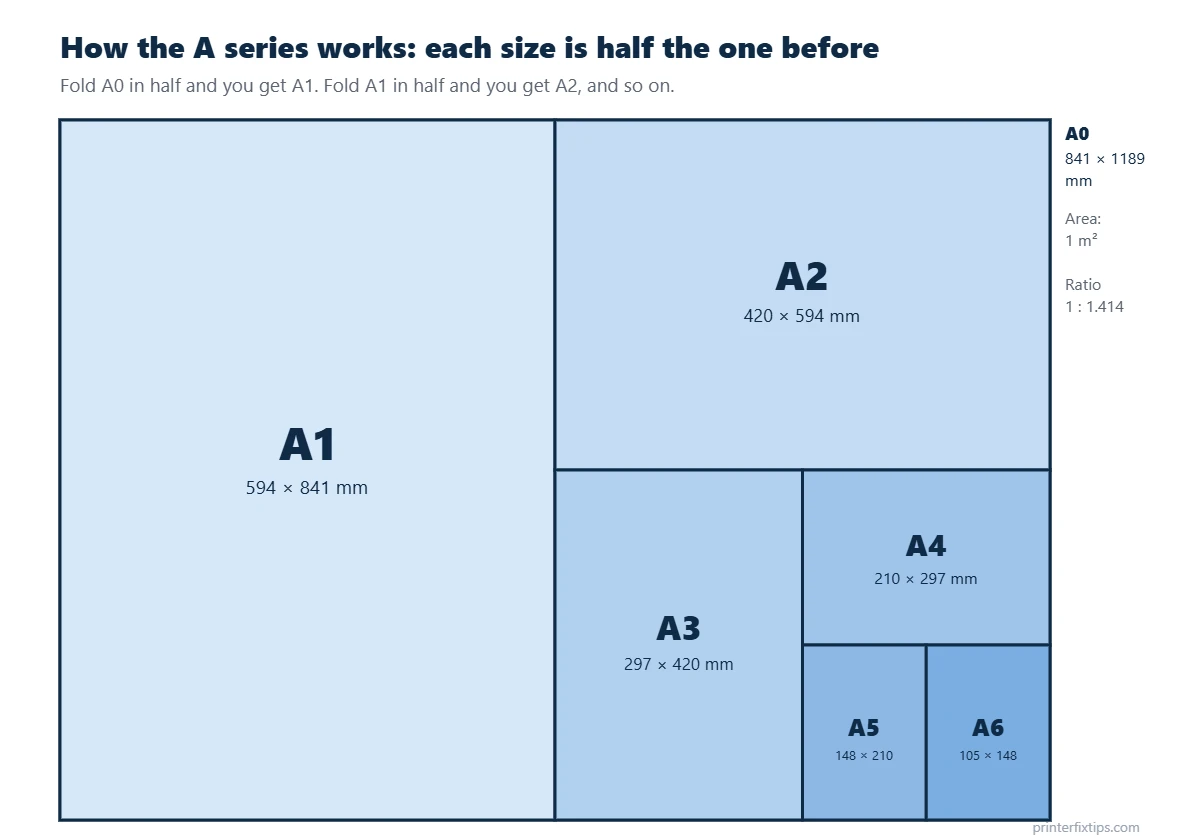
The A series is defined in the international standard ISO 216. It is built on one simple idea: every sheet has a width-to-height ratio of 1 : 1.414 (the square root of 2). Because of that ratio, cutting a sheet in half across its long side gives you the next size down with exactly the same shape.
A0 has an area of one square meter (841 × 1189 mm). Halve it and you get A1. Halve A1 and you get A2, then A3, A4 and so on. This is also why you can shrink an A3 page to A4 on a copier at 71% without anything getting stretched.
| A size | Millimeters | Inches |
|---|---|---|
| A0 | 841 × 1189 | 33.1 × 46.8 |
| A1 | 594 × 841 | 23.4 × 33.1 |
| A2 | 420 × 594 | 16.5 × 23.4 |
| A3 | 297 × 420 | 11.7 × 16.5 |
| A4 | 210 × 297 | 8.3 × 11.7 |
| A5 | 148 × 210 | 5.8 × 8.3 |
| A6 | 105 × 148 | 4.1 × 5.8 |
There is also a B series that sits between the A sizes (B5 is 176 × 250 mm). Japan uses its own JIS B sizes, which are slightly larger, so a “B5” notebook from Japan measures 182 × 257 mm.
Letter vs A4: What’s the Difference?
- Width: Letter is 215.9 mm, A4 is 210 mm. Letter is 5.9 mm (about 1/4 inch) wider.
- Height: Letter is 279.4 mm, A4 is 297 mm. A4 is 17.6 mm (about 0.69 inch) taller.
- Shape: Letter is a bit wider and squarer. A4 is slimmer and longer.
- Where it’s used: Letter in the US, Canada, Mexico, the Philippines and some Latin American countries. A4 nearly everywhere else.
Can you use A4 paper in a US printer? Yes. Every modern home printer supports both sizes. Just choose A4 in the print dialog so the printer knows how long the sheet is. The same goes for Letter paper in a printer bought in Europe or Asia.
Printer Paper Size in Pixels
Paper has no fixed pixel size. The number of pixels depends on the resolution (DPI, dots per inch) you design at. For anything you plan to print, design at 300 DPI. Use 72 or 96 DPI only for screen previews.
| Resolution | Letter (8.5 × 11 in) | A4 (210 × 297 mm) |
|---|---|---|
| 72 DPI | 612 × 792 px | 595 × 842 px |
| 96 DPI | 816 × 1056 px | 794 × 1123 px |
| 150 DPI | 1275 × 1650 px | 1240 × 1754 px |
| 300 DPI (print quality) | 2550 × 3300 px | 2480 × 3508 px |
Tip: In Canva, Photoshop or GIMP, set the canvas to 8.5 × 11 in at 300 DPI instead of typing pixels. The app works out 2550 × 3300 px for you and the print comes out sharp.
Printer Paper Weight and Thickness
Size tells you how big the sheet is. Weight tells you how heavy and stiff it feels. US paper is sold by “pound” (lb) weight, while the rest of the world uses grams per square meter (gsm). A normal sheet of 20 lb copy paper is about 0.1 mm (0.004 in) thick.
| US weight | Metric (approx.) | Feels like / best for |
|---|---|---|
| 20 lb bond | 75 gsm | Standard copy paper, everyday printing |
| 24 lb bond | 90 gsm | Resumes, reports, double-sided printing |
| 28 lb bond | 105 gsm | Presentations, color handouts |
| 32 lb bond | 120 gsm | Brochures, premium letters |
| 65 lb cover | 176 gsm | Light cardstock, invitations |
| 80 lb cover | 216 gsm | Greeting cards, menus |
| 100 lb cover | 270 gsm | Heavy cardstock, business cards |
A ream holds 500 sheets, and a case usually holds 10 reams (5,000 sheets). Before you load cardstock, look up the maximum paper weight in your printer’s specifications. Heavy paper fed through a printer that cannot handle it is one of the most common causes of paper jams and feed problems.
How to Set the Paper Size on Your Printer
The paper size has to match in two places: the document you are printing and the tray in the printer. If they don’t match, you will get cut-off pages, extra white space or a “paper size mismatch” message.
Windows 11 and Windows 10
- Open the document and press Ctrl + P.
- Pick your printer, then click Printer Properties, Preferences or More settings (the label depends on the app).
- Find Paper size (often on the Paper/Quality or Layout tab) and choose Letter, A4 or whatever you loaded.
- To change the default for every print job, go to Settings > Bluetooth & devices > Printers & scanners, select the printer, open Printing preferences and set the paper size there. On Windows 10 the path starts at Settings > Devices.
Mac
- Press Command + P.
- Click Show Details if you only see a small dialog.
- Choose the size from the Paper Size menu. To make a size the default, open System Settings > Printers & Scanners and change Default paper size.
Microsoft Word
Go to Layout > Size and pick Letter or A4. To make it stick for new documents, choose More Paper Sizes, select the size and click Set As Default.
Google Docs
Open File > Page setup, choose the paper size, then click Set as default if you want every new document to use it.
On the printer itself
Many printers ask what you loaded every time you close the paper tray. If yours does, pick the same size you chose on the computer. If it never asks and you keep getting a size error, look for Tray settings or Paper setup in the printer’s menu.
How to Print A4 on Letter Paper (and Vice Versa)
Someone sends you an A4 PDF and you only have Letter paper. Because A4 is taller, the bottom of each page can get clipped. Here is how to avoid that:
- Adobe Acrobat Reader: in the print dialog, under Page Size & Handling, choose Fit or Shrink oversized pages.
- Chrome or Edge: open More settings and set Scale to Fit to printable area.
- Mac Preview: tick Scale to Fit and choose Print Entire Image.
- Microsoft Word: go to File > Options > Advanced, scroll to the Print section and turn on Scale content for A4 or 8.5 x 11″ paper sizes.
The page shrinks by about 3 to 6 percent, which is hard to notice on normal text. Going the other way, Letter onto A4, the same settings stop the right edge from being trimmed.
Still printing wrong after you fix the size? If pages come out blank, faded or not at all, the problem is not the paper. Our guide on why your printer is not printing walks through those fixes.
Frequently Asked Questions
Is printer paper 8.5 x 11?
Yes, in the US, Canada and Mexico. Standard printer paper there is Letter size, 8.5 × 11 inches (215.9 × 279.4 mm). In most other countries, standard paper is A4, which is 210 × 297 mm.
Is A4 the same as 8.5 x 11?
No. They are close but not the same. A4 is 8.27 × 11.69 inches, so it is about a quarter inch narrower and about 0.7 inch taller than 8.5 × 11 Letter paper.
What size is legal paper?
Legal paper is 8.5 × 14 inches (215.9 × 355.6 mm). It is as wide as Letter paper but 3 inches longer.
What is 11 x 17 paper called?
11 × 17 inch paper is called Tabloid when it is upright and Ledger when it is turned sideways. In engineering it is called ANSI B. The closest international size is A3 (297 × 420 mm).
What size is half a sheet of printer paper?
Half of a Letter sheet is 5.5 × 8.5 inches, known as Half Letter or Statement. Half of an A4 sheet is A5, which is 148 × 210 mm.
What is the most common paper size in the world?
A4 is the most widely used paper size in the world. Letter is the most common size only in North America and a few other countries.
What size is printer paper in pixels?
At 300 DPI, which is what you want for printing, Letter paper is 2550 × 3300 pixels and A4 is 2480 × 3508 pixels.
Can a regular printer print 11 x 17?
Most home printers cannot. They top out at Legal (8.5 × 14 in). To print Tabloid or A3 you need a wide-format printer that lists 11 × 17 or A3 in its supported paper sizes.
Now that you know which size you have, check that the same size is selected in the print dialog and on the printer, and most size problems go away. If the printer still refuses to cooperate, browse our printer setup and driver guides or tell us what is happening.